I lost 340 dollars on a funded account because of a mouse click. Not a bad strategy, not a news spike, not a rule I misunderstood. I was trying to close half a EURUSD position in a hurry, I clicked the wrong row in the Terminal, and I closed the whole trade instead of half of it. The runner I had planned for two days was gone, the profit I had already banked stayed banked, and the lesson cost me more than any indicator course ever has: on a funded account, speed is a risk control, not a convenience.
In this article
- Why a shortcut is a drawdown rule, not a time-saver
- The twelve shortcuts I actually use
- Order shortcuts: F9 and the ticket I check every time
- Chart shortcuts: reading levels without leaving the chart
- The crosshair maths: from measured distance to lot size
- My funded-account shortcut routine
- I tested it: twelve trades, timed, with the keys
- Shortcuts that can breach you
- When shortcuts do not help at all
- Frequently asked questions
That was the week I stopped treating MetaTrader 5 like a mouse-driven app and started treating it like a cockpit. I learned twelve shortcuts, I practised them on a demo account until my fingers knew them, and I wrote a small set of rules about which keys are allowed during a live session and which ones are not. My entries did not get better. My execution did, and on a funded account execution is where drawdown actually happens: a stop placed ten pips too far, a position closed in full by mistake, a chart switched at the wrong second so you read the wrong timeframe.
This is not a list copied from the MT5 help file. It is the shortcut set I use on a 100,000 dollar funded account with a 5,000 dollar daily loss limit, the maths I run with the crosshair before I press F9, the session routine that keeps the keys from becoming a new way to rush, and the shortcuts I deliberately refuse to use live. If you already use MT5 price alerts, this article sits next to that one: alerts tell you when to look, shortcuts decide how cleanly you act when you do.
Why a shortcut is a drawdown rule, not a time-saver
A funded account punishes slow, fiddly execution in a specific way. Your daily loss limit is a hard ceiling, usually 5 percent, and every second you spend hunting through menus is a second in which price can move your stop further away or your discipline can soften. A shortcut does three things a mouse click cannot do reliably under pressure: it hits the same action every time, it keeps your eyes on the chart instead of the menu, and it removes the one extra click where most misclicks happen.
The counter-argument is real and I will deal with it honestly later: shortcuts also make mistakes faster. Pressing F9 twice, closing the wrong chart with Ctrl W, or deleting a drawing with Backspace are all faster with keys than with a mouse. That is why this article has two halves. The first half is the keys I use. The second half is the guardrails that stop the keys from hurting me. A shortcut without a guardrail is just a quicker way to breach.
One more honesty note before the lists. MT5 hotkeys are fixed for most functions; you cannot remap F9 or Ctrl F to something else inside the terminal. The official MT5 hotkeys reference lists far more keys than I use, and that is the point of this article: the full list is a reference, not a routine. So the skill is not customisation, it is selection: knowing twelve keys cold beats knowing forty keys vaguely, because under pressure you only ever reach for the ones you trust.
The twelve shortcuts I actually use
Here is the whole set, nothing more. If a shortcut is not on this table, I do not use it live, and that restraint is part of the system.
| Shortcut | What it does | Why it matters on a funded account |
|---|---|---|
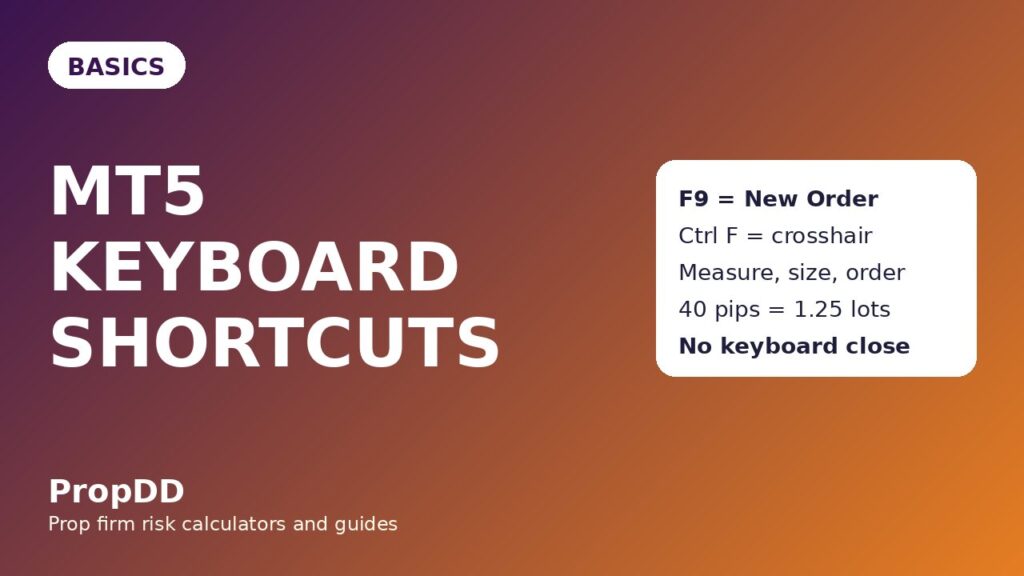
| F9 | Opens the New Order window | One key from chart to ticket, no menu hunting while price runs |
| Ctrl F | Crosshair measurement tool | Measures entry-to-stop distance in pips before sizing |
| Ctrl G | Shows or hides the chart grid | Clears visual noise before reading a level |
| Ctrl I | Opens the Indicators List | Checks or removes an indicator without right-click menus |
| Ctrl B | Opens the Objects List | Finds and deletes a stray trendline fast |
| Ctrl T | Shows or hides the Terminal | Brings positions and exposure into view in one key |
| Ctrl M | Shows or hides Market Watch | Switches symbols without leaving the chart |
| Alt 1, Alt 2, Alt 3 | Bar chart, candlestick chart, line chart | Confirms a level on a clean line chart in seconds |
| Ctrl F6 | Moves to the previous chart window | Flips between EURUSD and GBPUSD without the mouse |
| F11 | Full-screen chart | Removes panels during the London open review |
| Ctrl D | Shows or hides the Data Window | Reads exact open, high, low and close values |
| Backspace | Deletes the last drawn object | Undoes one bad drawing immediately, used only before entry |
Notice what is missing. There is no shortcut here for closing a position, because closing from the keyboard is exactly where my 340 dollar mistake lived: the close action belongs on a deliberate mouse click on the right row, after reading the ticket. Speed matters for preparing a trade. Deliberation matters for ending one.
Order shortcuts: F9 and the ticket I check every time
F9 is the most valuable key in the set and the most dangerous, so it gets a rule of its own: F9 opens the ticket, it never submits it. I press F9, I read the symbol, the volume, and the stop and target fields out loud in my head, and only then do I click. The shortcut saves the menu hunt. It does not save the thinking, and any trader who lets it do both is one tired afternoon away from a wrong-size order.
My ticket check is always the same four items, in the same order: symbol, volume from the sizing maths below, stop distance in pips, and whether one-click trading is on or off. That last item matters because of what I covered in my one-click trading article: with one-click on, a click on the chart itself can open a trade, and that changes what every other key press risks. I keep one-click off during funded sessions, and I check it in the ticket window rather than assuming it stayed off.
Pending orders get the same treatment. I set them from the ticket window after measuring the level with the crosshair, and I verify them in the Terminal with Ctrl T before I walk away. A pending order placed by muscle memory and never checked is not a plan, it is a hope with a stop attached.
Chart shortcuts: reading levels without leaving the chart
Most of my shortcut value is not in ordering at all. It is in reading. Ctrl F, the crosshair, is the key I press more than any other, because it turns a guess about stop distance into a number. Click on the entry level, drag to the stop level, and MT5 shows the distance. That distance goes straight into the sizing formula in the next section, and that is the whole point: measure first, size second, order third.
Ctrl G and Alt 3 are my declutter pair. When a chart gets crowded with old drawings, I hide the grid, switch to a line chart for one clean look at the level, then switch back to candles. Ctrl I and Ctrl B do the same job for indicators and objects: if I cannot name every line on my chart, I open the list and remove the ones I cannot defend. A funded account does not reward a chart that looks impressive. It rewards a chart you can read in three seconds.
Ctrl F6 deserves a warning of its own. Flipping between chart windows is fast, and fast is how you read EURUSD levels while thinking you are on GBPUSD. My rule is simple: after Ctrl F6, I read the symbol in the top-left corner before I read anything else. It takes half a second and it has saved me from at least two wrong-symbol entries that I will not pretend never nearly happened.
The crosshair maths: from measured distance to lot size
Here is the formula box, because a shortcut article without sizing maths would be a typing tutorial, and typing tutorials do not protect a daily limit. I trade a 100,000 dollar funded account, I risk 500 dollars per trade, and one standard lot of EURUSD is worth 10 dollars per pip.
| Step | Formula | Worked numbers |
|---|---|---|
| Measure the stop distance | Crosshair from entry to stop | Entry 1.0920, stop 1.0880, distance 40 pips |
| Risk per trade | Fixed dollar risk | 500 dollars |
| Pip value | Per standard lot | 10 dollars per pip on EURUSD |
| Lot size | Risk divided by (distance x pip value) | 500 divided by (40 x 10) = 1.25 lots |
| First target | Entry plus one times the risk distance | 1.0920 plus 40 pips = 1.0960, plus 500 dollars |
| Second target | Entry plus two times the risk distance | 1.0920 plus 80 pips = 1.1000, plus 1,000 dollars |
Read that table as a chain, not as separate facts. If the crosshair says 40 pips, the size is 1.25 lots. If the crosshair says 60 pips, the size is not 1.25 lots any more, it is 0.83 lots, and entering the old size on the new distance is how a 500 dollar risk quietly becomes a 750 dollar risk. The shortcut that matters most is therefore not F9. It is Ctrl F, pressed before F9, every single time.
| Stop distance (pips) | Lot size at 500 dollars risk | First target value |
|---|---|---|
| 20 | 2.50 lots | 500 dollars |
| 30 | 1.67 lots | 500 dollars |
| 40 | 1.25 lots | 500 dollars |
| 50 | 1.00 lot | 500 dollars |
| 60 | 0.83 lots | 500 dollars |
One caution on the numbers. The 10 dollars per pip figure is for a standard lot of EURUSD on a dollar-denominated account. Gold, indices and cross pairs have different pip values, and the sizing formula breaks if you carry the EURUSD number into another symbol. I run the same crosshair measurement on every symbol, and I check the pip value for that symbol before I trust the lot size. The linked max daily drawdown calculator is where I sanity-check the day as a whole: one trade at 500 dollars risk is 10 percent of a 5,000 dollar daily limit, so ten careless trades, not one bad trade, is what usually ends a funded day.
My funded-account shortcut routine
Shortcuts only help inside a routine. Outside one, they just help you rush. Here is the session routine I actually follow, with the keys attached to each phase so there is no improvisation when the market opens.
| Phase | What I do | Keys used |
|---|---|---|
| Before London | Clean charts, check indicators and objects, read the Data Window for key levels | Ctrl I, Ctrl B, Ctrl D, Ctrl G |
| Level marking | Draw levels, delete the one bad drawing, switch to a line chart to confirm | Backspace, Alt 3, Alt 2 |
| Trade preparation | Measure entry-to-stop with the crosshair, run the sizing maths, open the ticket | Ctrl F, F9 |
| Live management | Terminal open for exposure, partial closes by deliberate mouse click only | Ctrl T, no keyboard close |
| End of session | Full-screen review, hide the Terminal, note which shortcut felt awkward | F11, Ctrl T |
The end-of-session note is the part most traders skip and the part that made the biggest difference for me. If a shortcut felt awkward twice in one week, I practise it on demo for ten minutes the next morning. Shortcuts are muscle memory, and muscle memory is built in practice, not purchased in a moment of live-market urgency. My MT5 price alerts article covers the other half of this routine: the alert tells me when to open the chart, and the routine above decides what my hands do once I am there.
I tested it: twelve trades, timed, with the keys
I timed myself for two weeks, not to prove that shortcuts are fast in general, but to prove that they were fast for me without adding errors. First, the plain timing test: opening an order ticket by menu took me about 14 seconds on average across ten tries, and F9 took about 2 seconds. Measuring a stop distance by estimating from the price scale took about 20 seconds and was wrong by 5 to 10 pips twice; the crosshair took about 4 seconds and was exact every time. Those are my timings on my machine, not a universal benchmark, and your numbers will differ. The direction is what matters: the shortcut did not just save seconds, it removed the estimation error.
Then the twelve-trade log. Every trade below used the same account rules: 500 dollars risk, crosshair-measured stop, F9 ticket, no keyboard close, partial closes by mouse where noted in my journal. The shortcut column shows the key that did the most work on that trade.
| Trade | Pair and shortcut that mattered | Result |
|---|---|---|
| 1 | EURUSD, Ctrl F measured a 40-pip stop | Win, plus 1R |
| 2 | GBPUSD, F9 ticket after a clean level read | Win, plus 2R |
| 3 | EURUSD, Ctrl F6 flip caught a wrong-symbol read | Loss, minus 1R |
| 4 | EURUSD, Alt 3 line-chart level confirmation | Win, plus 1R |
| 5 | GBPUSD, Ctrl B removed a stale trendline first | Loss, minus 1R |
| 6 | EURUSD, Ctrl F re-measured after a level shift | Win, plus 2R |
| 7 | EURUSD, Ctrl D confirmed the exact level close | Win, plus 1R |
| 8 | GBPUSD, F11 full-screen review before entry | Loss, minus 1R |
| 9 | EURUSD, Ctrl G declutter before the London open | Win, plus 2R |
| 10 | GBPUSD, Ctrl I removed a conflicting indicator | Loss, minus 1R |
| 11 | EURUSD, Ctrl F plus F9 in the right order | Win, plus 1R |
| 12 | GBPUSD, Ctrl T exposure check before entry | Loss, minus 1R |
The maths on that log is deliberately plain. Seven wins gave 10R in total, five losses cost 5R, and the net is plus 5R, which is 2,500 dollars at 500 dollars risk per trade. I do not present that as proof that shortcuts make money. Shortcuts do not create an edge; they protect one by cutting execution errors. Trade 3 is the honest example: the flip shortcut caught a mistake before it became a position, and that save is worth more than any seconds saved, because a wrong-symbol trade at full size is a drawdown event, not a delay.
Shortcuts that can breach you
This is the section I wish I had read first, because every shortcut on the safe list has a careless cousin. Here are the five mistakes I have made or watched a funded trader make, and the rule I now use for each.
First, double-pressing F9. On a slow terminal, the first press seems to do nothing, you press again, and two ticket windows stack up. My rule is one press, then wait, then read. Second, closing a chart with Ctrl W while meaning to close something else. A closed chart is not a lost trade, but a lost template and a lost set of levels at the worst moment is a real cost, so Ctrl W is not on my live list at all. Third, Backspace deleting a level you still needed, because the last drawn object was not the one you meant. I only use Backspace before entry, never during a live trade, and I screenshot key levels before I clean a chart.
Fourth, one-click trading combined with fast keys. If one-click is on, a stray click near the chart can open a trade you never meant to take, and the speed of everything else in this article makes that accident arrive faster. I covered the full one-click setup in my one-click trading article, and my funded rule stays the same: one-click off, ticket check on. Fifth, treating a trailing stop as if the keyboard set it and forgot it. Trailing stops in MT5 run on your terminal, not on the server, so closing MT5 or losing the connection stops the trail and leaves only the fixed stop. No shortcut changes that, and any article that implies otherwise is selling speed, not safety.
If you take one rule from this section, take this: never practise a new shortcut live. Every key in the twelve above earned its place on a demo account first. A funded account is the worst classroom in trading, because tuition there is charged in drawdown.
When shortcuts do not help at all
There are funded-account situations where keys are irrelevant, and pretending otherwise would make this article dishonest. During a major news spike, spreads widen, fills slip, and no shortcut improves the price you get; the right move is usually the one I covered in my pending orders article, which is to have the order already working rather than to chase the move by hand. When your connection drops, MT5 shortcuts do nothing at all, and your fixed stop is the only protection you have, which is why the stop goes in at entry and never as an afterthought.
Shortcuts also do not fix a bad strategy, a too-large size, or a revenge-trade mindset. I know this because I have typed faster into all three. If you are on a losing streak, the answer is in the losing-streak maths and the reset plan, not in a quicker ticket window. My losing streak article and my partial closes article both sit on the same principle as this one: the system around the trade matters more than the speed of any single action inside it. Shortcuts belong inside that system, not instead of it.
Finally, shortcuts do not replace alerts. A key cannot tell you that price reached your level while you were away from the desk. That is why the alerts article and this one are a pair in my routine: alerts for attention, shortcuts for clean action, and a written routine tying the two together so neither one becomes a rush.
Frequently asked questions
Do MT5 keyboard shortcuts work on every funded account?
Yes, for the terminal itself: F9, Ctrl F, Ctrl G and the rest are MT5 functions, not firm functions. What changes between firms is the account rule around them, such as whether one-click trading is allowed, so check your firm’s platform rules before you rely on any execution shortcut.
Which single shortcut should a funded trader learn first?
Ctrl F, the crosshair. It is the only shortcut that directly improves your sizing maths, because it replaces a guessed stop distance with a measured one, and sizing is where most funded accounts quietly leak risk.
Can a shortcut accidentally close my position?
Not from the twelve in this article, because none of them is a close command, and that is deliberate. The real accidental-close risk is one-click trading on the chart or clicking the wrong Terminal row, which is why closes in my routine are always deliberate mouse clicks on a checked row.
Is F9 faster than one-click trading?
One-click is faster, and that is exactly why I do not use it on funded sessions. F9 is fast enough to remove the menu hunt while still forcing a ticket check, and that check is worth more than the second or two that one-click saves.
Do shortcuts work on the MT5 mobile app?
No, not in the same way. The mobile app has its own touch gestures and no keyboard, so this article is for the desktop terminal. If you trade mostly on mobile, build a mobile routine instead of trying to copy desktop keys onto a phone screen.
How long does it take to learn twelve shortcuts properly?
About two weeks of demo practice in my experience: one week to learn the keys, and a second week to learn when not to use them. If a shortcut still feels awkward after two weeks of practice, drop it from your live set rather than forcing it into a funded session.
Risk disclaimer: This article describes how I use MT5 shortcuts on a funded account. It is education, not financial advice, and shortcut speed does not remove market risk. Practise every shortcut on a demo account first, check your firm’s platform rules, and never trade with money you cannot afford to lose.



1 comment
[…] directly to the other MT5 habits on this site. My MT5 price alerts tell me when to look, my MT5 keyboard shortcuts decide how fast I act, and my MT5 pending orders decide where I wait. Templates and profiles sit […]