Imagine finishing a rough session late in the evening, going to bed, and waking up believing you start fresh today. Depending on your firm’s server clock, your next trade could still count against yesterday’s loss, or the “new day” might have started in the middle of your afternoon without you noticing. The reset time is a small detail with an outsized effect on whether you breach.
In this article
- What "reset time" means
- Common patterns (not rules for any one firm)
- Server time versus your time
- How to find your reset time
- Daylight saving: the twice-a-year trap
- Trades that cross the reset
- Swaps, rollover and the reset
- Planning sessions around the reset
- Capture the start-of-day figure
- Where the dashboard can differ from your platform
- A short checklist
- Common mistakes
- Example: a London-session trader
- Multiple accounts and copied trades
- Reset time and other time-based rules
- A tiny reset routine
- When in doubt, ask
- Further reading
- Frequently asked questions
- The short version
- The daily limit is measured over a 24-hour window that restarts at a specific time, often in server time rather than your local time.
- Find the exact hour in the rulebook, confirm it against your platform clock and write it in your own time zone.
- Daylight saving changes can shift the reset relative to your local time twice a year, so recheck when clocks change.
This guide explains what reset time means, the common patterns firms use, how to find yours, how daylight saving can trick you and how to plan trades around the reset. Once you know it, plug your new start-of-day equity into the drawdown calculator at that moment and the maths is easy.
What “reset time” means
Your daily loss limit isn’t measured from “now”. It’s measured from a fixed point in time: the moment the firm starts counting a new day. At that point, the firm records your balance or equity (depending on the rule) as your start-of-day figure, and the daily limit is calculated from there. Everything you do until the next reset counts toward the same day.
That moment is the reset time. Get it wrong by a few hours and you could believe you have a full allowance when you’ve already used most of it. For the maths that follows from the start-of-day figure, see how to calculate max daily loss.
Common patterns (not rules for any one firm)
Different firms use different conventions. These are the broad patterns you’ll come across, and they’re described here only so you know what to look for in your own rulebook.
- Midnight server time. The day starts at 00:00 on the trading platform’s clock.
- A fixed market-close time. Often tied to the end of the New York trading day, which many forex brokers use to define their daily candle.
- UTC or GMT midnight. A fixed universal time that doesn’t depend on any local zone.
- A custom time stated in the terms, sometimes different between evaluation and funded phases.
Never assume the one you saw on a video applies to your firm. Read the exact sentence.
Server time versus your time
Three clocks are in play and they rarely agree: your local time, the platform’s server time and the firm’s rulebook time. A trader in Lahore, a trader in London and a trader in New York can all be watching the same chart at the same instant with three different clock readings. The platform’s clock is often set to something like GMT+2 or GMT+3, matching the broker’s convention, and the firm’s rulebook might use yet another standard.
| Server reset | Equivalent in UTC (winter) | Example local time at UTC+5 |
|---|---|---|
| 00:00 at GMT+2 | 22:00 (previous day) | 03:00 |
| 00:00 at GMT+3 | 21:00 (previous day) | 02:00 |
| 00:00 UTC | 00:00 | 05:00 |
| 17:00 New York | 22:00 | 03:00 |
These are only examples to show how different the same “midnight” can be in your own clock. Use a reliable converter such as the time zone converter on timeanddate.com and check your own figures.
How to find your reset time
- Search the rulebook for “reset”, “daily”, “server time” and “UTC”. Copy the exact sentence into your notes.
- Look at your chart. The newest candle on a daily chart shows the platform’s current time and often the open time of the day. Compare it with your local clock to get the offset.
- Check the dashboard. Many firm dashboards show a daily loss indicator that resets at a visible time. Note when it changes.
- Ask support in writing. A short message such as “At what exact time and time zone does the daily loss limit reset?” gets a clear reference you can keep.
Daylight saving: the twice-a-year trap
If a firm uses a time tied to a region that observes daylight saving, the reset moves relative to your local time when the clocks change. And because the US and Europe change clocks on different dates, there are a few weeks each year when the gap between New York and London is different from usual. A reset that was at 03:00 for you last month might be at 02:00 or 04:00 now.
It’s easy to forget, and the consequences are real: you might open a session believing the day has reset when it hasn’t, or the other way round. Check the dates of the changes each year on a site such as timeanddate’s daylight saving pages and recheck your reset time the week after.
Trades that cross the reset
A trade opened before the reset and still open afterwards creates an interesting wrinkle. Under an equity-based rule, its floating loss counts in whichever day it sits in at each moment, so the same position can use up yesterday’s allowance and then today’s. Some traders deliberately avoid carrying trades across the reset for exactly this reason, because it makes the maths harder and mistakes easier.
If you do carry a trade, note its floating result at the reset moment. That figure is part of your new start-of-day equity if the rule uses equity. It’s a good habit to take a screenshot at the reset time.
Swaps, rollover and the reset
For many brokers, swap is charged at the daily rollover, which is often close to the same time as the platform day change. That means a swap charge can land exactly around the reset and appear in either the previous or the next day’s totals. Whether swaps count toward the daily loss at all depends on the firm, which we explain in swaps and commissions. Spreads also tend to be wider around rollover, so avoid opening new trades in that window.
Planning sessions around the reset
Think about when your trading hours fall relative to the reset. If it comes in the middle of your preferred session, you’ll effectively get two “days” inside one sitting, which can be useful or dangerous. Some traders deliberately finish before the reset so that a bad session can’t spill into the next day’s start. Others use the reset as a clean break to start again with a calm head. Neither is wrong, but you should decide on purpose.
It also affects news. A major release near the reset can land in either day, and the daily room you thought you had may be different from what the firm sees. See news trading and daily drawdown for how to handle that.
Capture the start-of-day figure
At the reset time, record your equity and balance. A phone alarm and a screenshot take ten seconds and prevent most disputes. Enter the equity into the calculator, set today’s profit and loss to zero and note your floor and personal stop. If you trade during the Asian or London session, the reset might happen while you sleep, so check the dashboard when you wake and note the starting figure the firm used.
Where the dashboard can differ from your platform
Some dashboards update with a delay of seconds or minutes. A trade you closed right before the reset might be counted on the previous day on the dashboard even though your platform shows it after. Compare both and, if a mismatch looks material, ask support which timestamp the firm uses. Keep screenshots with visible times.
A short checklist
- I know the exact reset hour and its time zone, from the rulebook.
- I’ve written it in my own time zone.
- I know whether daylight saving affects it, and when it next changes.
- I record my start-of-day equity at that moment.
- I avoid opening new trades during rollover.
- I know how I treat trades that cross the reset.
Common mistakes
- Assuming the day resets at local midnight.
- Forgetting daylight saving changes.
- Using the previous day’s floor in the new day.
- Not recording the start-of-day equity.
- Carrying a large floating loss across the reset without a plan.
Example: a London-session trader
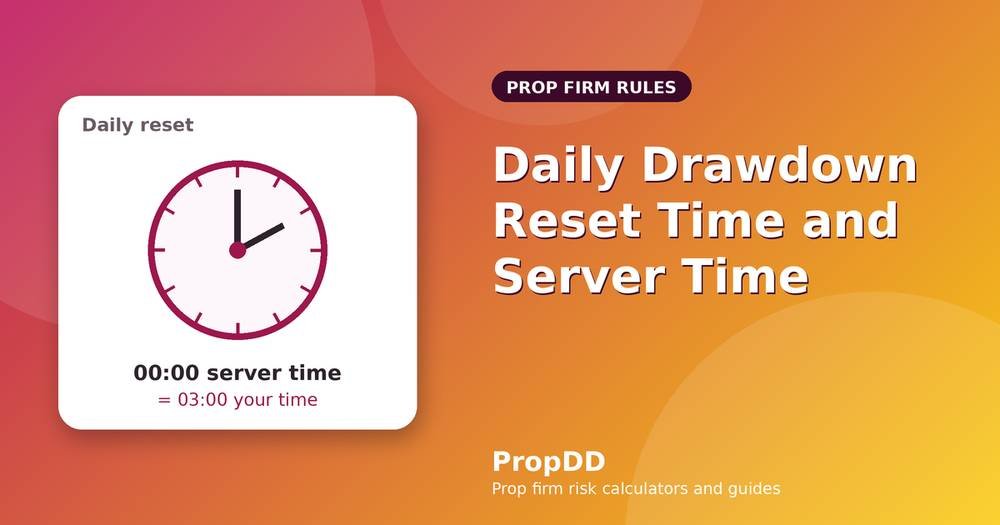
Take a trader in Karachi (UTC+5) whose firm resets the daily limit at 00:00 server time, with the server on GMT+2 in winter. Midnight GMT+2 is 22:00 UTC, which is 03:00 the next morning in Karachi. So the trader’s “firm day” runs from 03:00 to 03:00 local time.
The London session, which opens around 08:00 UTC (13:00 Karachi), falls mid-day in the firm’s day, and the New York session close sits just before the reset. A trader who wakes at 07:00 sees almost four hours of the firm’s day already behind them. If something happened overnight, such as a gap or a late-night trade left open, it counts against today’s allowance before they sit down.
When the server switches to GMT+3 in summer, the same midnight moves to 02:00 Karachi time. Nothing in the rulebook changed, but the practical window shifted an hour. This is exactly the kind of drift to catch by checking twice a year.
Multiple accounts and copied trades
If you run several accounts with different firms, each may reset at a different time. A single trade copied across all of them might be counted on different days. Keep a small table with each firm’s reset time in your own zone, and check it before you copy trades or size across accounts. It’s a small chore that prevents a very confusing breach.
Reset time and other time-based rules
The daily reset isn’t the only clock in the rulebook. Some firms have weekly profit-consistency rules, minimum trading days or inactivity limits, and each may count days by the same server time. If your firm has such rules, find out whether a “trading day” is defined by the same boundary. A trade placed at 23:50 server time might count towards one day and its profit toward another, and that can affect rules that look at best-day profit or minimum days.
A tiny reset routine
- Set a phone alarm five minutes before your reset time.
- When it rings, check for open trades. Decide whether to hold or close.
- At the reset, record balance and equity with a screenshot.
- Enter the equity into the calculator and write the new floor.
- Reset your personal stop and trade count for the new day.
Two minutes, once a day, and the reset stops being a source of surprises.
When in doubt, ask
If the rulebook and the dashboard seem to disagree, ask support before you trade, and ask in writing. A one-line question about the exact reset time and the time zone costs nothing and can save an account. Good firms answer clearly; if a firm can’t tell you when your trading day begins, that’s useful information about the firm as well. Keep the reply in your notes next to your floor and your personal stop.
Make it a habit to recheck after any change to the firm’s terms. Rules evolve, and so do server settings, so a quick confirmation every few months keeps your plan aligned with reality.
Further reading
A free, neutral reference for basic market hours and sessions is the BabyPips forex school, and Investopedia explains how slippage can appear when markets reopen or rollover happens. For checking release times in your own zone, the TradingView economic calendar lets you set your time zone.
Frequently asked questions
Is the reset always at midnight?
No. It might be midnight server time, a market-close time or another fixed point. Read your rulebook and confirm with support.
Does the reset time differ between evaluation and funded accounts?
It can. Some firms keep it the same; others change it. Check both sections of the terms.
What if the dashboard and platform show different times?
Use the firm’s stated time as the standard, and confirm it in writing so you have a record.
Can I trade right after the reset safely?
Spreads are often wide around rollover, so many traders wait a few minutes. The reset gives you a fresh allowance but not a fresh market.
The short version
The reset time decides which losses count today. Find it, convert it, write it down and recheck it when clocks change. Then use the new start-of-day figure in the calculator, set a personal daily stop and trade within it. If the whole idea of the daily limit is new to you, start with the prop firm max daily drawdown explained, and read the checklist of rules to verify before you buy.